

Power strip holder for an organized desk

A power strip holder is a simple and effective solution to cable clutter at your desk. It securely fastens the power strip under the desk, eliminating tripping hazards from the floor and protecting cables from damage.
Why Cable Management is Crucial for Your Desk
A cluttered workspace often starts with cables. A power strip lying loosely on the floor is a safety hazard. Loose cables collect dust, become tripping hazards, and can be damaged by pulling or kinking.
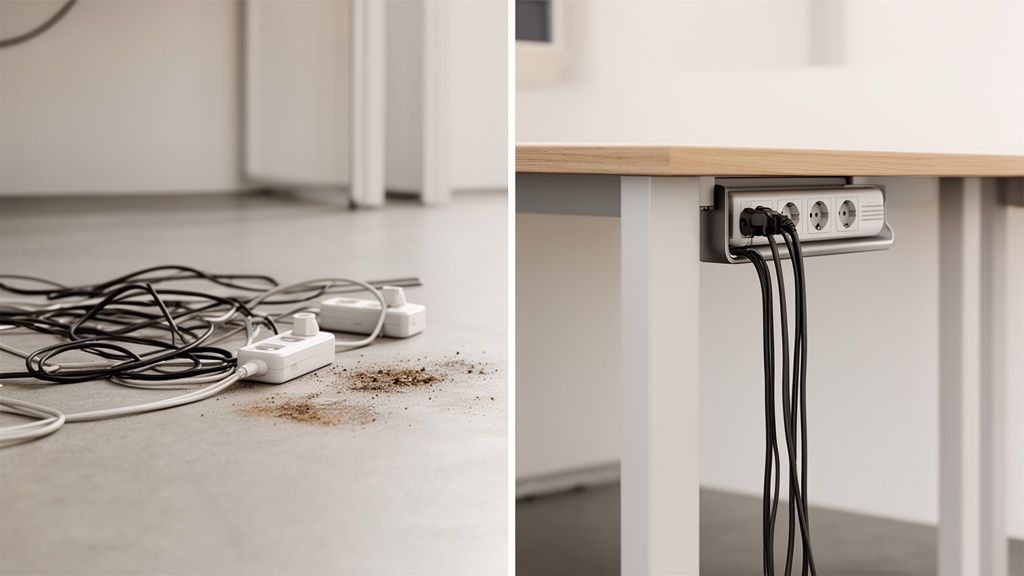
A power strip holder creates a fixed base for your power supply directly at your desk.
Safety and Durability
Clean cable routing offers more safety and a longer lifespan for your devices.
- No tripping hazards: Permanently mounted power strips keep cables off the floor and reduce the risk of accidents.
- Protection against cable breakage: When cables are not left unprotected, the strain on the plugs is minimized. This prevents loose connections and cable breaks.
- Reduced fire risk: In a clean environment, less dust accumulates in and around power outlets. This prevents impaired heat dissipation and overheating.
According to a survey by the Institute for Employment Research (IAB), 67% of home office users find cable clutter disruptive to ergonomics and safety. For Deskspace, with over 25,000 customers, a holder not only means a tidy setup. It ensures durability by relieving stress on cables and reducing dust accumulation by up to 40%.
Order and Efficiency
A tidy workspace supports concentration and productivity. Those who don't have to untangle cables can focus on important tasks.
Thoughtful cable management is the foundation for a professional workspace. It simplifies cleaning and ensures the trouble-free operation of technology.
For height-adjustable desks, fixed cable routing is indispensable. It ensures that the desk moves freely without cables getting tangled or plugs becoming disconnected. You can read more about this in our article on cable management at the workplace. A clean workspace helps to increase productivity in remote teams.
Finding the Right Holder for Your Desk
Not every holder fits every desk or power strip. Choosing the right model is crucial for a stable and clean solution. There are various types that differ in material, mounting, and flexibility.
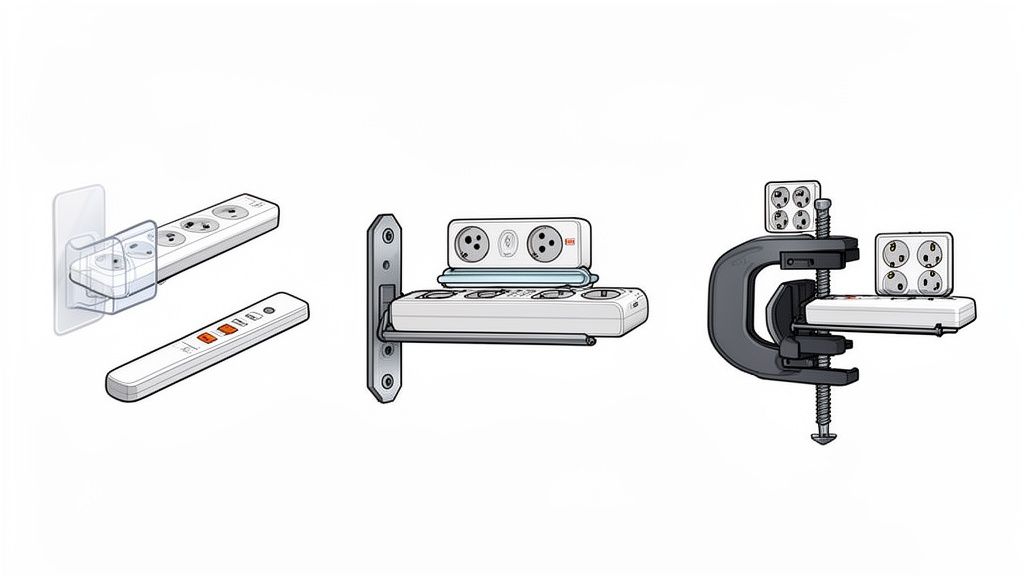
Your decision depends on your tabletop, the size of the power strip, and your personal preferences. A Deskspace desk with a solid wood top offers different possibilities than a table with a thin surface.
Screw-On Models for Maximum Stability
A screwed-on power strip holder offers the highest stability. These holders are attached directly under the tabletop and provide a secure grip. They are also suitable for heavy power strips with multiple power adapters.
This type of fastening is ideal for a permanent solution. It ensures that nothing loosens, even when a height-adjustable desk is moved.
The stability of a screwed-on mount is unsurpassed. It prevents vibrations and ensures that the power strip stays securely in place. This protects the lifespan of your cables.
Power strips are used in 92% of households. Of these, 55% have difficulties with proper attachment. Secure mounting prevents defects, which in 28% of cases are caused by overheating. A VDE study confirms that good cable management can reduce accidents by 65%. Further insights are offered in a market analysis for power strips and their accessories.
Flexible Adhesive Solutions as an Alternative
If you don't want to drill holes in your tabletop, adhesive mounts are a good alternative. Modern adhesive strips have high adhesive strength and are easy to attach to smooth surfaces. This is often a good choice for rental apartments or delicate desks.
However, the load capacity is limited. Durability depends on the surface and ambient temperature. For heavy strips or rough surfaces, this method is less suitable.
Check Material and Compatibility
Most mounts are made of metal or plastic.
- Metal mounts are more robust and durable. They are the first choice for heavy power strips and maximum stability.
- Plastic mounts are often cheaper and lighter. They are sufficient for smaller, lightweight power strips.
Measure your power strip before buying. Width and depth are crucial. Compare the dimensions with the holder's specifications. Many models are adjustable, offering more flexibility.
Comparison of Mounting Methods for Power Strip Holders
This table helps you find the right solution for your desk.
| Mounting Method | Advantages | Disadvantages | Ideal for |
|---|---|---|---|
| Screws | Very high stability, permanent hold, high load capacity | Requires drilling, higher installation effort | Permanent setups, heavy power strips, height-adjustable desks |
| Adhesive | No damage to tabletop, easy and quick installation | Lower load capacity, durability depends on surface | Delicate surfaces, light power strips, renters |
| Clamps | Flexible and reusable, no damage to the surface | Less stable than screws, not suitable for all table edges | Temporary setups, frequently changing workspaces |
Choosing the right holder is an important step for an organized workspace. By matching the mounting method and material to your needs, you create a safe and clean base.
How to Install Your Holder
Proper installation is crucial for a safe and organized workspace. The process is simple, from planning to final inspection. A well-chosen position and fastening prevent cable clutter and ensure long-term durability.
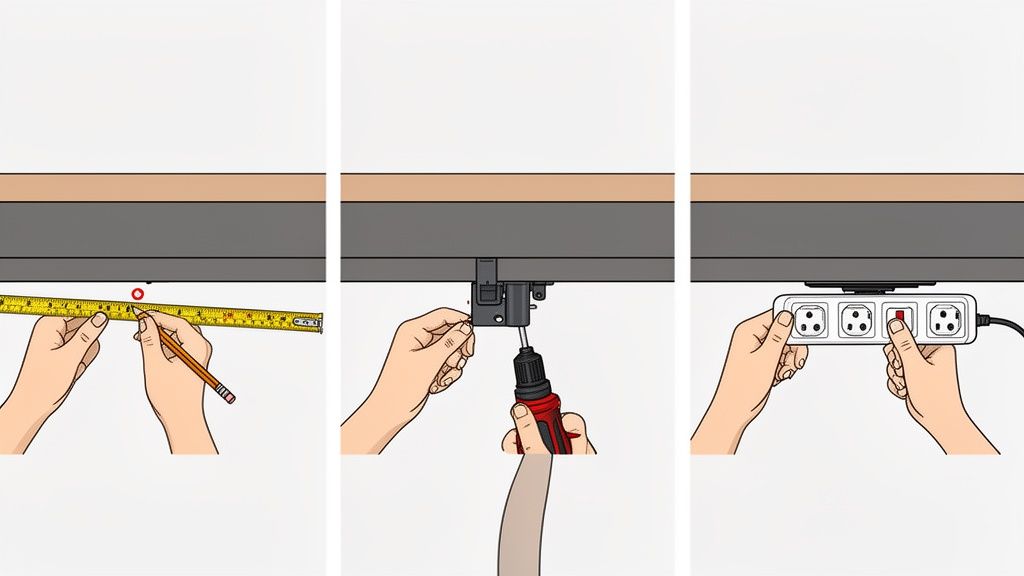
Finding the Perfect Position
Plan the position of your holder before installation. A spot centered in the back third of the tabletop has proven effective. This way, the outlets are accessible, but the strip is not in the way.
Sit at your desk to test the position. If your knees hit it, the mount needs to be moved further back. For a height-adjustable desk, ensure the mount does not collide with the desk frame or motors.
Choose a position that avoids collision with the desk frame. Measure the distance to the frame and plan for at least 5 cm of buffer. This also provides enough space for cables and plugs.
Place the power strip tentatively at the planned location. Check if all important monitor and PC cables are long enough. Only begin installation once everything fits.
Prepare Tools
Depending on the fastening method, you will need different tools. Good preparation simplifies installation.
For screw mounting:
- Cordless drill: With a wood drill bit slightly thinner than the screw core.
- Screwdriver: For carefully tightening the screws.
- Folding rule or tape measure: For precise spacing.
- Pencil: For marking drill holes.
For adhesive mounting:
- A clean, lint-free cloth.
- Cleaning agent: Isopropyl alcohol or another grease-dissolving cleaner.
- Your hands: To press the holder firmly.
A clean surface is crucial for both methods. Thoroughly wipe the area under the tabletop.
Mark and Attach
Take your time with this step. Precision ensures a stable result.
For screw mounting, hold the holder in the desired position and mark the drill holes. Carefully pre-drill the holes, not too deep. Then screw the holder firmly in place.
For an adhesive mount, clean the surface thoroughly with isopropyl alcohol and let it dry. Peel off the protective film from the adhesive strip, position the holder, and press it firmly for at least 30 seconds. Allow the adhesive the manufacturer-recommended curing time before inserting the power strip.
Details on mounting Deskspace desks can be found in our detailed guide for the Deskspace PRO.
Final Check and Cable Management
After installation, place the power strip in the holder and connect your devices.
Check that the holder is firmly seated. Move it slightly. For a height-adjustable desk, move it completely up and down once. Make sure no cables are strained or tangled.
Bundle cables with cable ties or hook-and-loop fasteners. This improves aesthetics, safety, and the lifespan of your devices.
Practical Tips for Perfect Cable Management
The holder is installed. Further steps are needed for a professional setup. With the right methods, you can transform your workspace into an organized command center.
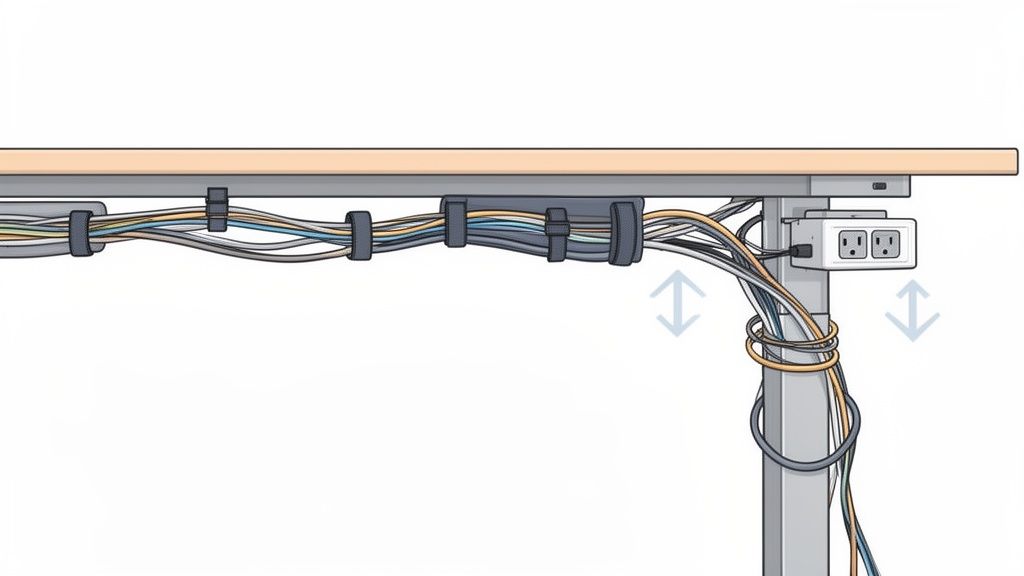
The key is to bundle cables purposefully and route them discreetly. Instead of many loose cables, clean strands emerge.
Bundle and Route Cables
A tidy setup begins with bundling. Loose cables look messy, collect dust, and get tangled.
- Hook-and-loop cable ties: They are reusable and gentle on cables. Ideal for setups you adjust frequently.
- Cable sleeves: They bundle entire groups of cables into a flexible casing. The result is a clean strand.
- Disposable cable ties: An inexpensive and firm solution for cables that are permanently bundled.
Route the bundled strands invisibly along the desk frame or under the tabletop.
For a height-adjustable desk, allow enough slack in cable length. This prevents anything from getting caught when you change the desk height.
Adjust Cable Lengths and Store Power Adapters
Included cables are often too long. Unnecessary cable loops detract from the appearance and collect dust. Coil up excess lengths and secure them with a hook-and-loop strap.
Bulky power adapters and chargers should also be placed under the tabletop. Special holders or a cable tray can help. A Deskspace cable tray offers enough space to store several power adapters invisibly, in addition to the power strip.
The Result: A Minimalist Appearance
When all cables are bundled and routed, your workspace appears calmer and tidier.
The combination of a power strip holder and these management techniques creates a practical and aesthetic setup. It simplifies cleaning, prevents cable damage, and promotes concentration.
Safety Instructions and Common Mistakes
A tidy desk is a safe workspace. A correctly mounted power strip holder helps to avoid dangers. Incorrectly routed or overloaded power strips pose a serious risk.
The most important rule is to observe the maximum load. Every power strip has a power limit in watts (W), stated on the rating plate. Values around 3,500 watts are common. Exceeding this can lead to overheating and fire.
Avoid Overloading and Cascading
The most common mistake is cascading, i.e., connecting multiple power strips in series. The maximum power of the first strip is quickly exceeded.
Avoid daisy-chaining power strips. The entire load concentrates on the first strip, posing a significant fire hazard.
Ensure that the ventilation slots of the strip remain clear. Mounting in a holder ensures good air circulation and prevents heat build-up.
Recognize Quality by Test Seals
When purchasing, look for recognized test seals.
- GS Mark ("Geprüfte Sicherheit" - Tested Safety): This voluntary seal confirms that the product has been tested by an independent body and meets the requirements of the German Product Safety Act.
- CE Marking: The manufacturer declares that its product meets basic EU requirements. It is not an independent test seal.
Statistics show the importance of safe installation. In Germany, there are around 14,000 electrical accidents annually. 19% of these are due to improperly used power strips. Correct mounting with a holder reduces this risk to less than 3%. Dust accumulation is reduced by up to 50%, and the IP20 protection is maintained. More on market development and safety standards for power strips can be found here.
Typical Installation and Usage Errors
Use screws that match the thickness of your tabletop. Screws that are too long can damage the surface; those that are too short do not provide a secure hold.
Do not mount the power strip in locations where it could be exposed to moisture. Regularly check all cables for visible damage such as kinks or cracks. A damaged cable must be replaced immediately.
By observing these points, you ensure an organized and safe workspace.
Frequently Asked Questions About Power Strip Holders
Here you will find answers to frequently asked questions about power strip holders.
Can I use any holder for any power strip?
No, universal fit is rare. Compatibility is crucial. Before buying, measure the exact width and depth of your power strip.
Compare these measurements with the holder's specifications. Many models are adjustable and offer some leeway, but prior checking avoids problems.
How much weight can a power strip holder support?
The load capacity depends on the model and the mounting method.
- Screwed-on metal holders are very robust. They can support heavy strips with multiple power adapters. Their load capacity is often several kilograms.
- Adhesive holders are a lighter option. Their load capacity is sufficient for a normal power strip without many heavy adapters. Manufacturer specifications are usually in the range of 1 kg to 3 kg.
Consider not only the weight of the strip but also the pull of the plugged-in cables. Plan a buffer, especially for a height-adjustable desk.
Is a holder also suitable for glass or metal tabletops?
Yes, but the mounting method must be adjusted. Screws are unsuitable here.
For glass or metal tables, adhesive variants or clamp-on holders are ideal. For adhesive solutions, the surface must be absolutely clean, dry, and grease-free. Test the adhesive on an inconspicuous area for delicate surfaces.
Can a holder hinder the heat dissipation of the power strip?
No, a well-designed power strip holder improves heat dissipation. It creates distance between the strip and the tabletop, allowing air to circulate.
This prevents heat build-up that can occur with cramped strips or those lying on the floor. Ensure that the holder does not cover any ventilation slots of the power strip.
A tidy workspace starts with the details. With ergonomic solutions from DESKSPACE, you bring order and safety to your setup. Learn more at deskspace.de


