

Correct sitting at a desk for a pain-free workday

Sitting correctly at your desk is not an option. It is the foundation for a healthy and productive workday. An ergonomic posture relieves strain on the spine, promotes blood circulation, and prevents common office complaints such as neck and back pain. It is the basis for a focused and pain-free workday.
Why the right sitting posture at your desk is so crucial
Sitting for hours is the daily routine for many. The problem is that our body is not designed for this rigid position. Incorrect posture at the desk forces muscles, ligaments, and intervertebral discs into an unnatural position. This almost inevitably leads to tension and pain.
The consequences of poor sitting posture are diverse. A hunched posture, often known as a rounded back, puts constant pressure on the intervertebral discs. In the long term, this can lead to chronic back problems.
The health consequences of incorrect sitting
The consequences of an unsuitable sitting position are well documented. They affect the musculoskeletal system and impact the entire body.
- Musculoskeletal disorders: Persistent incorrect loading is a major cause of back, neck, and shoulder complaints.
- Reduced blood circulation: Bent legs or a slumped posture can disrupt blood circulation. The result is often tired, heavy legs.
- Reduced concentration: Poor posture hinders oxygen intake. The brain is supplied less effectively, leading to fatigue and poor concentration.
The extent of the problem is enormous. According to the DKV Report 2023, people in Germany sit an average of 554 minutes per working day. That's 9.2 hours. At the same time, the Federal Institute for Occupational Safety and Health documented 104.8 million lost days due to musculoskeletal disorders. You can read more about the correlations at the Arbeitsagentur.
Sitting correctly at your desk is an active measure for health prevention. It's about enabling the body to maintain a neutral, supported, and relieving position.
The positive effect of ergonomic posture
Investing in correct sitting posture pays off immediately. Those who sit ergonomically create the conditions for a productive workday.
An upright posture relieves strain on the spine. The intervertebral discs get the space they need for regeneration. The abdominal and back muscles are activated and strengthened instead of passively collapsing. This stabilizes the entire torso and prevents postural damage.
In addition, an open body posture ensures that the diaphragm can work freely. Breathing becomes deeper and more even, which improves the body's oxygen supply. The result is more energy, higher concentration, and increased productivity.
How to adjust your office chair for optimal posture
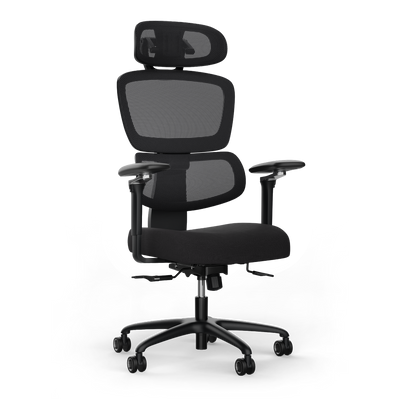
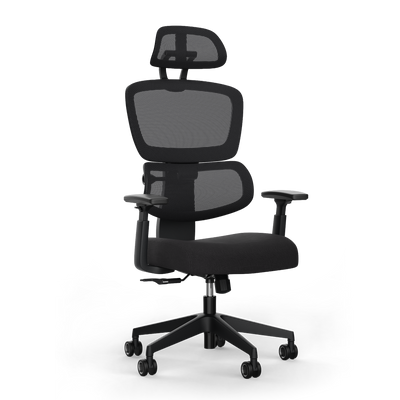
Your office chair is the foundation for sitting correctly at your desk. Even the best model is useless if it's set up incorrectly. Adjusting it to your body is the first and most important step towards an ergonomic workstation.
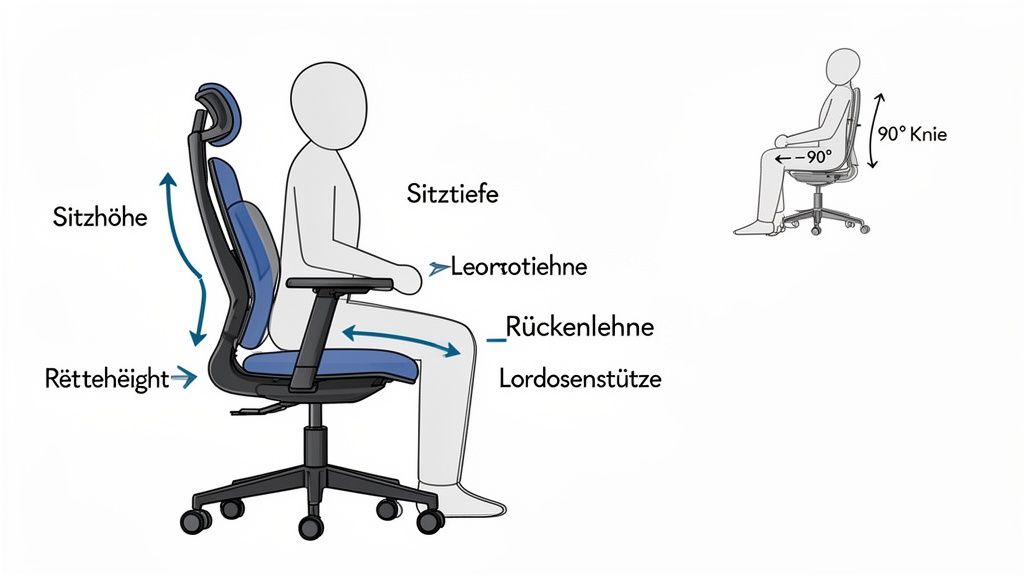
Adjustment is straightforward. You use your body as a benchmark to find a neutral, relieving sitting position.
Take your time for these basic settings. It's a direct investment in your health and concentration.
Setting the seat height as a starting point
Everything begins with the correct seat height. It determines the position of your legs and influences your entire posture. The goal is a stable base with good blood circulation.
Stand in front of your chair. Adjust the seat so that it is just below your kneecaps. Then sit down. Your feet should now be flat on the floor with the entire sole.
Your lower legs should be vertical. Your thighs should slope slightly downwards. Your hips should be slightly higher than your knees. This posture relieves pressure from your thighs and allows blood to circulate.
Important note: The angle between your upper and lower leg should be at least 90 degrees. This prevents your knee pits from getting pinched.
If your feet are dangling in the air, your desk is too high. A footrest is necessary in this case to achieve the correct leg position.
Adjusting the seat depth correctly
After height comes depth. The correct adjustment of the seat supports the back optimally while relieving pressure from the knee pits.
Slide your buttocks all the way back to the backrest. Push the seat forward or backward so that there is about two to four finger-widths of space between the front edge of the chair and your knee pits.
This distance ensures that no blood vessels are compressed. At the same time, the majority of your thighs are supported by the seat. This ensures stable weight distribution.
Detailed instructions can be found in our guide on how to adjust your office chair ergonomically.
Positioning the backrest and lumbar support
The backrest with integrated lumbar support is crucial. Its task is to support the natural S-shape of your spine in the lumbar region.
Lean back. The backrest should reach at least to the middle of your shoulder blades. The lumbar support is the most important part.
Position it precisely in the natural curve of your lower back. A good orientation is your belt line. The support should provide noticeable but comfortable support.
A correctly adjusted backrest relieves strain on the intervertebral discs, prevents a rounded back, and promotes an upright posture.
Bringing armrests to the correct height
Armrests relieve your shoulder and neck area. If adjusted incorrectly, they can cause new tension.
Let your shoulders relax. Raise the armrests to a height where your forearms rest comfortably. Your upper arms should hang loosely and vertically. The angle between your upper and lower arm should be about 90 degrees.
Make sure you don't have to pull your shoulders up. They should also not be pushed upwards. Find the position where your shoulders remain relaxed.
Checklist for optimal chair adjustment
This checklist summarizes the most important points. Use it to adjust your office chair step by step.
| Adjustment area | Goal of adjustment | How to check it |
|---|---|---|
| Seat height | Stable base, good circulation | Feet flat on the floor, knee angle > 90°, hips slightly above knees |
| Seat depth | Support thighs, free knee pits | 2-4 finger-widths space between seat edge and knee pit |
| Backrest | Support natural S-curve of the spine | Lumbar support at belt line height, provides comfortable support |
| Armrests | Relieve neck and shoulder muscles | Forearms rest comfortably with relaxed shoulders, elbow angle approx. 90° |
With these settings, you create the basis. In the next step, you'll focus on the alignment of your desk and monitor.
Your chair is adjusted. Now for the desk and monitor. Their alignment determines whether you're tense in the evening.
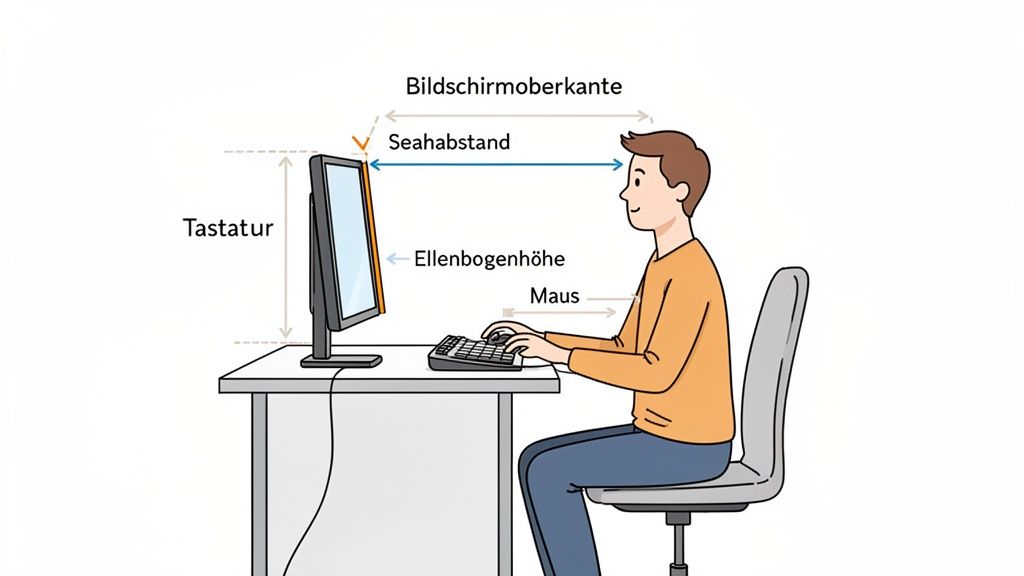
I'll show you how to adjust everything to relieve your neck, shoulder, and arm muscles.
Adjusting the desk height precisely
The ideal height for your desk depends on you and your sitting height. The rule of thumb is simple: The desktop should be at the same height as your elbows.
Sit upright. Let your upper arms hang loosely by your sides. Bend your forearms at a 90-degree angle. Your hands should hover relaxed just above the desktop or rest gently on it.
- If the desk is too high, you automatically pull your shoulders up. This leads to neck and shoulder tension.
- If the desk is too low, you lean forward. This hunched posture puts a strain on the intervertebral discs.
A height-adjustable desk allows for millimeter-precise adjustment. With a fixed desk, you'll need to adjust the chair height and potentially use a footrest.
Positioning the monitor correctly
Incorrect monitor position often causes neck pain. Those who constantly tilt or turn their head overload the cervical spine. The result is headaches and chronic complaints.
Three rules help prevent this.
- Distance: Extend your arm straight. Your fingertips should touch the screen. This distance of about 50 to 80 cm is ideal for your eyes.
- Height: The top edge of the screen should be at your eye level or slightly below. Your gaze will then naturally tilt slightly downwards. This relaxes the neck muscles.
- Alignment: Always place the monitor directly in front of you. If you work with two monitors, the main screen goes directly in front of you. The second is placed slightly angled next to it.
A monitor mount for the desk is a good investment for your neck health. It allows you to flexibly and precisely adjust height, depth, and tilt.
Arranging keyboard and mouse ergonomically
The position of the keyboard and mouse is crucial to avoid cramped wrists.
Your keyboard should be placed so that there is 10 to 15 cm of space between it and the edge of the desk. This gives your palms a resting surface. Forearms and hands should form as straight a line as possible.
The mouse belongs directly next to the keyboard. Do not reach too far out. This creates tension in the shoulder and arm.
A tidy workspace helps with positioning. Approaches like the Clean Desk Principle are useful not only for aesthetics but also for ergonomics.
Checklist for workstation alignment
| Component | Optimal setting | Why it's important |
|---|---|---|
| Desk height | Desktop at elbow height with a 90-degree arm angle | Prevents hunched shoulders and a rounded back. |
| Monitor distance | One arm's length (approx. 50-80 cm) | Protects the eyes and prevents a forward head posture. |
| Monitor height | Top edge at or just below eye level | Relieves the neck muscles and promotes an upright head posture. |
| Keyboard & Mouse | Close to the body, 10-15 cm from the desk edge | Ensures a neutral wrist position and avoids reaching outwards. |
Chair, desk, and monitor are now optimally aligned. This creates the basis for healthy working. Now, all that's left is to incorporate movement.
The role of movement and dynamic sitting
Even the best ergonomic posture becomes a burden if you remain in it for hours. Sitting correctly at your desk is not a static state, but a dynamic process. Your body is made for movement. Lack of movement is a major cause of tension.
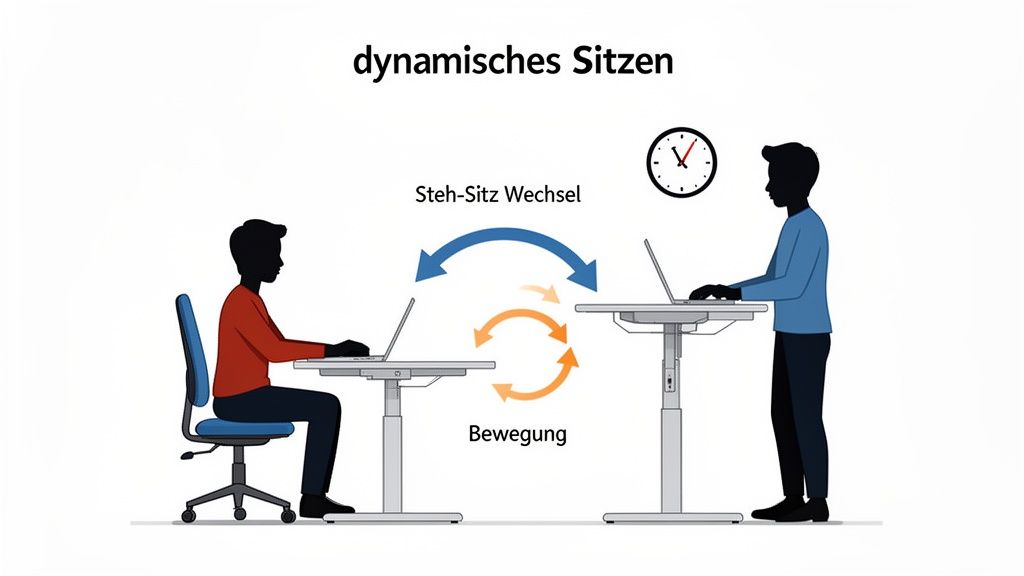
The key to a healthy back lies in dynamic sitting. The concept is simple: instead of seeking a single position, you regularly change your posture. Every change of posture activates different muscle groups, promotes blood circulation, and relieves stressed body regions.
These micro-movements supply your intervertebral discs with nutrients. This keeps them healthy and resilient. Dynamic sitting is an active strategy to prevent tension.
What dynamic sitting practically means
Dynamic sitting can be easily integrated into daily work. It's about small, conscious changes to your sitting position.
This technique keeps your core muscles active and prevents you from slumping into an unhealthy posture. You can implement this simply:
- Leaning forward: Shift your weight slightly forward. Your backrest continues to provide support.
- Sitting upright: This is your neutral starting position, where you use the backrest for relief.
- Leaning back: Use phases like phone calls to consciously lean back. This maximally relieves the spine.
The frequent change between these three positions is the basis of dynamic sitting. It prevents muscle groups from tiring.
Additionally, you can incorporate small movements. Shift your weight from one buttock to the other or gently tilt your pelvis back and forth. Every impulse is better than rigid immobility.
Finding the balance between sitting and standing
The most effective method for more movement is regularly alternating between sitting and standing. A height-adjustable desk is the ideal tool for this. It allows you to quickly change your working position.
Experts recommend a balanced distribution of working postures. The 60-30-10 rule provides good guidance:
- 60% dynamic sitting: You spend most of your working time sitting, but you constantly change your position.
- 30% standing: Work about a third of the time standing. This activates your leg and core muscles.
- 10% walking: Use the remaining time for movement. Get water, talk on the phone while walking, or do stretching exercises.
A height-adjustable desk makes this change effortless. You can complete phases of concentrated work while sitting and switch to standing mode for meetings or phone calls. This promotes your back health and can increase concentration.
For specific instructions, check out our guide for more movement at the workplace with simple exercises. It shows you how to stay active without much effort.
Recognizing typical posture mistakes and actively avoiding them
Even with the best equipment, mistakes often creep in unconsciously. These habits sabotage every ergonomic setting and are often the cause of tension.
It is crucial to recognize these patterns in yourself to make correct sitting at your desk a routine.
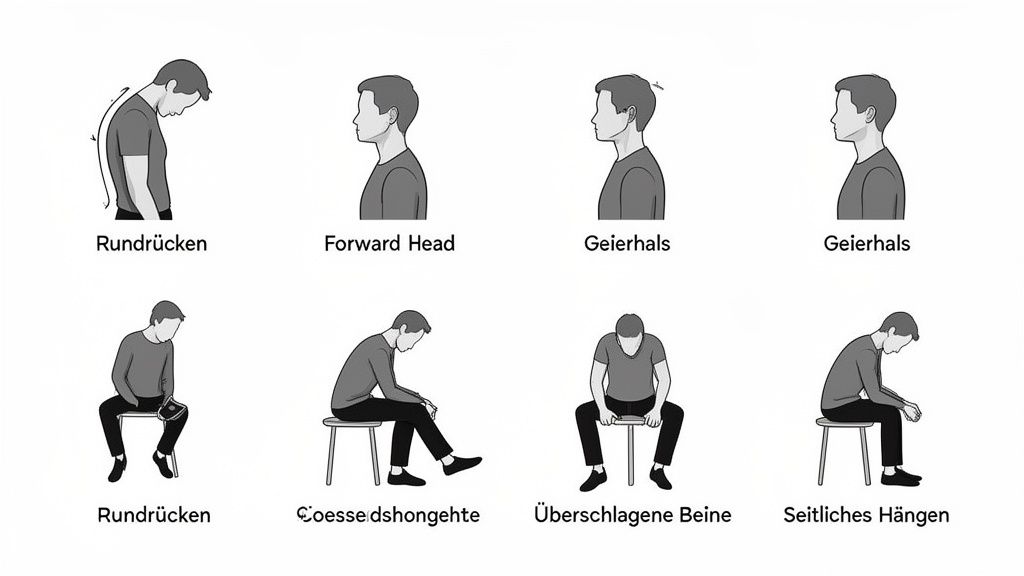
Most of these errors can be corrected with mindfulness and simple adjustments. Let's look at the most common posture mistakes.
The classic rounded back
The rounded back is the best-known postural defect. The upper body falls forward, the shoulders pull inward, and the upper back is severely curved. This often happens when the monitor is too low or too far away.
This posture puts a strain on the intervertebral discs. It weakens the back muscles and leads to a shortening of the chest muscles. This exacerbates the misalignment.
Pro tip: Use your backrest. Slide your buttocks all the way back. The lumbar support brings your spine into its natural S-shape. Check the position of your monitor. The top edge should be at eye level.
The "vulture neck" or "turtle neck"
Closely related to the rounded back is the "vulture neck." In this posture, you push your head far forward. This often happens when working on a laptop without an external monitor.
For every centimeter your head moves forward, the strain on your cervical spine increases by several kilograms. The result is neck tension and headaches.
Crossed legs and incorrect foot position
Crossing your legs is stressful for the body. It leads to a twisting of the pelvis, which affects the spine. It can also impede blood circulation in the legs.
A similar problem arises when the feet are not firmly on the ground. If they dangle in the air, the stable base is missing. Your leg muscles remain permanently tense.
Common sitting errors and their solutions
This overview will help you quickly recognize and correct typical posture errors.
| Posture error | Possible consequence | Correction measure |
|---|---|---|
| Rounded back ("hunchback") | Intervertebral disc strain, back pain, shortened pectoral muscles | Actively use the backrest, slide buttocks all the way back, adjust lumbar support. |
| Forward head posture ("vulture neck") | Neck tension, headaches, cervical spine syndrome | Bring monitor to eye level, slightly tuck chin towards chest (double chin exercise). |
| Crossed legs | Pelvic tilt, unilateral strain, circulatory problems | Consciously place both feet flat on the floor next to each other. |
| Feet not on the floor | Lack of stability, muscle tension in the legs | Adjust chair height so feet are flat; use a footrest if necessary. |
| Shrugged shoulders | Tension in the shoulder-neck area | Consciously relax shoulders and let them drop; regular shoulder circle exercises. |
| Bent wrists | Tenosynovitis, carpal tunnel syndrome | Set keyboard flat, keep wrists straight, use ergonomic mouse/keyboard. |
This overview can serve as a reminder until correct posture becomes a habit.
With the home office boom, the situation has worsened. 66% of people working from home in Germany report regular complaints. A main reason is often working at unsuitable desks. You can read more about the connections at the unhealthy workplace on bergardi.com.
Awareness of these errors is the first step. With targeted corrections and suitable equipment, a healthy posture becomes the norm.
Frequently Asked Questions about Correct Sitting
In everyday life, specific questions about ergonomics often arise. Here you will find precise answers so you can optimize your workspace.
How high should my desk be?
The perfect desk height depends on your body size and the set sitting height. A general statement is not helpful. Orient yourself by a clear rule of thumb.
First, adjust your chair correctly. The desktop should now be exactly at the height of your elbows. Your upper arms hang loosely and vertically at your body. Ideally, your forearms form a 90-degree angle and rest flat on the desktop. Your shoulders remain relaxed.
The same principle applies when standing at a height-adjustable desk. Here too, you bring the desktop to elbow height.
What can I do if my feet don't reach the floor?
This is a classic problem with non-height-adjustable desks. If you have set your chair correctly to the desk height and your feet are dangling in the air, a footrest is the solution.
It bridges the distance to the floor and provides stable support. This maintains the 90-degree angle in your knees. This relieves pressure from your thighs and ensures blood circulation.
Pro tip: Avoid improvised solutions. A good footrest is stable, non-slip, and adjustable. This is a small investment that pays off for your posture.
How often should I change position?
The short answer: as often as possible. Remaining rigid for hours harms your back. The 60-30-10 rule has proven useful as a guide in everyday work.
- 60% dynamic sitting: You spend most of your time sitting. Consciously change your posture again and again.
- 30% standing: Use about a third of the time to work standing. This relieves strain on the spine.
- 10% walking: You should plan the remaining time for targeted movement. Get water, make phone calls while walking, or take a walk.
Specifically, this means: Change your posture at least every 30 to 45 minutes. A timer can help at first to get up or change your sitting position.
Is an ergonomic chair really necessary?
Yes. For anyone who spends several hours a day at a desk, an ergonomic chair is fundamental to health. A normal chair cannot meet the demands of a workday.
The difference lies in the adjustment options that an ergonomic office chair offers:
- Adjustable seat height
- Adjustable seat depth
- Flexible armrests
- An adjustable backrest with lumbar support
These functions allow you to perfectly adapt the chair to your body. It supports your spine, promotes an upright posture, and helps prevent tension and postural damage.
An ergonomic workspace is a conscious decision for your health. The products from Deskspace have been developed for this purpose. Find the height-adjustable desk and matching chair that will change your workday. Discover Deskspace's ergonomic solutions


