

The Right Height-Adjustable Laptop Stand: A Buyer's Guide

An height-adjustable laptop stand is a simple but effective tool. It elevates your laptop screen to eye level. This correction has a significant impact on your posture. It helps prevent neck and back pain caused by working in a hunched position for hours.
Why a height-adjustable laptop stand is important
Anyone who works regularly on a laptop knows the problem: a pull in the neck and tension in the shoulders. The cause is usually an unhealthy posture. Since the screen is fixed to the keyboard, the laptop forces you to tilt your head downwards. What is unproblematic in the short term becomes a strain on the cervical spine in the long run.

A height-adjustable laptop stand solves this problem. It decouples the screen from the work surface. You can position the top edge of the display exactly at eye level.
Achieve a healthy posture
The correct screen height is crucial for an upright posture. Once the screen is correctly positioned, your upper body straightens up almost by itself. Your neck remains straight and your shoulders can relax.
A small change with a big impact:
- Less neck pain: The cervical spine is noticeably relieved.
- Prevention of back pain: An upright sitting position supports the entire back.
- Better concentration: Fewer physical ailments lead to less distraction.
An investment in health and productivity
The trend towards home offices and flexible workplaces has made the laptop the central working tool. In 2023 alone, 2,899,000 notebooks were sold to end-users in Germany. In comparison, only 622,000 desktop PCs were sold. These figures show how important ergonomic accessories are for modern working habits.
An ergonomically designed workplace is the basis for long-term performance. It protects against health problems and demonstrably increases efficiency in daily work.
A well-equipped workplace with a height-adjustable laptop stand is more than just comfortable. It helps you work more easily and focused, and ultimately become more productive. The purchase is a direct investment in your well-being and the quality of your work.
The basics of ergonomics at the laptop workstation
An ergonomic workstation is more than just a comfortable chair. It is a system in which every part works together to optimally support the body. A height-adjustable laptop stand is a central component. However, it only unfolds its full effect in the right setup.
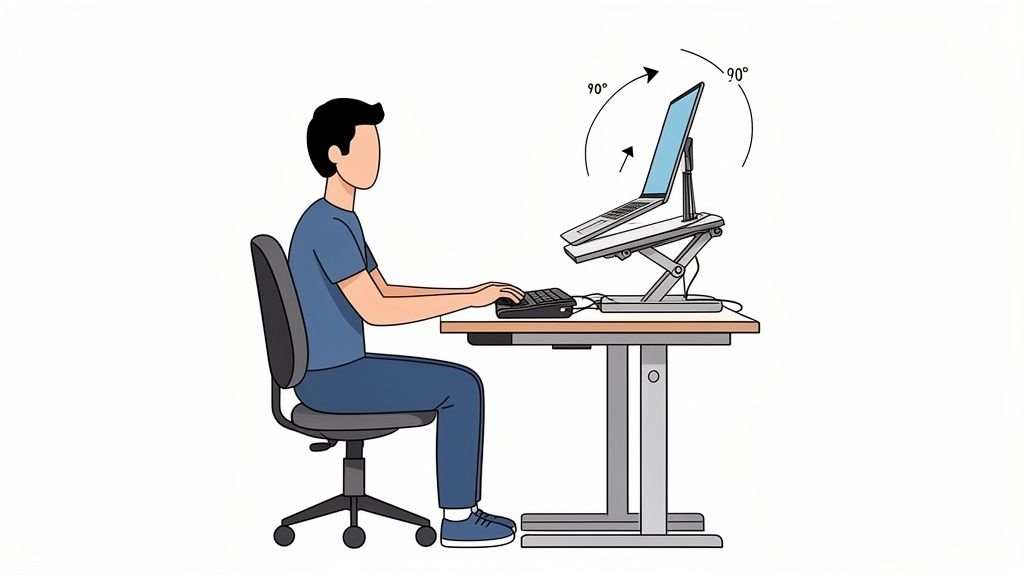
The correct setup of your workstation follows simple principles. They help you to adopt a neutral, relaxed posture and minimize typical strains.
Finding the ideal screen height
Bring your laptop screen to eye level. Imagine a straight line from your eyes to the top edge of your display.
- Guideline: The top edge of the screen should be at or slightly below your eye level.
- Effect: Your head remains in a natural position. You don't unconsciously tilt it forward and don't curve your cervical spine.
This small adjustment makes a big difference. Studies show that the correct screen height can reduce back pain by up to 54 percent. Up to 80 percent of office workers complain of discomfort due to poor posture. Therefore, this measure is crucial. In our overview, you will learn how to set up your workstation ergonomically.
The 90-degree rule for arms and legs
Once your screen is correctly positioned, the rest of your body follows. The 90-degree rule is a simple mnemonic for correct posture.
- Arms: Your elbows should form an angle of approximately 90 degrees when your hands are on the keyboard. Your forearms should be parallel to the floor.
- Legs: Your knees should also be bent at a 90-degree angle, with your feet flat on the floor.
This posture ensures an even weight distribution. It allows the muscles in the shoulders, arms, and legs to relax.
An ergonomic workplace is user-centric. It adapts to you, not the other way around. Every adjustment, from screen height to armrest, serves the goal of relieving your body and maximizing comfort.
External keyboard and mouse are indispensable
A height-adjustable laptop stand solves the problem of screen height. At the same time, a new challenge arises. The built-in keyboard and trackpad are now too high for a relaxed arm posture.
Therefore, the combination with external input devices is key to true ergonomics.
- External keyboard: Place it so that your elbows maintain the relaxed 90-degree angle.
- External mouse: It allows for a natural position for the hand and arm and prevents wrist kinking.
The principles of workplace ergonomics are closely related to the concept of UI/UX design, which also focuses on user-friendliness and comfort. Only with these external devices can you create a setup that corresponds to a full-fledged desktop workstation and enables healthy work in the long term.
What to look for when buying a laptop stand
Finding the right laptop stand is easy if you know what to look for. It must not only fit the size of your device. A good height-adjustable laptop stand must be stable, flexible, and durable. If you make a conscious decision here, you will permanently benefit from ergonomic advantages.
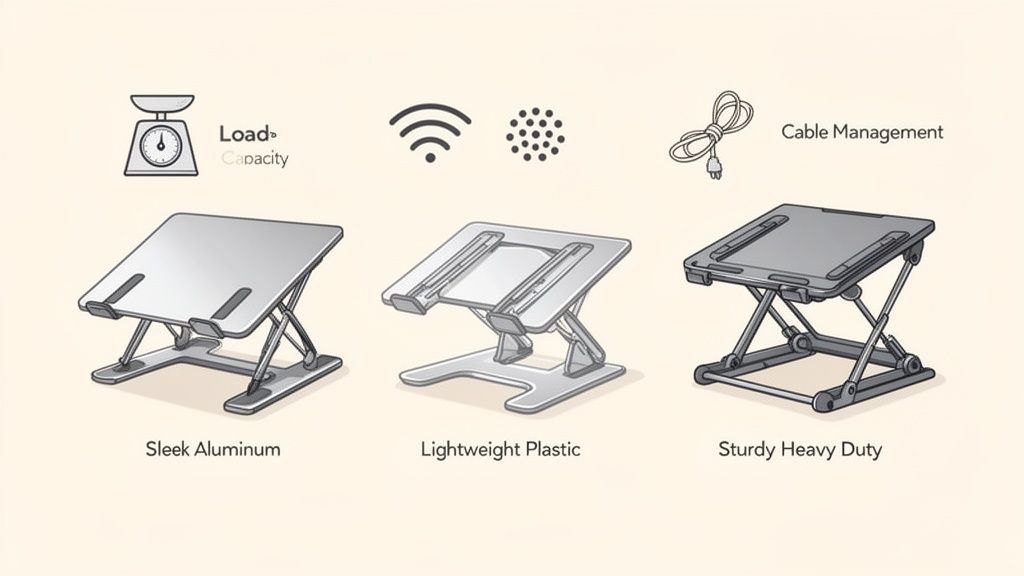
The decisive features are material, stability, adjustment options, and useful extras.
Material and stability
The material influences how securely your laptop stands and how durable the stand is.
- Aluminum: This is the best choice for most. It is lightweight, yet robust and does not warp. Aluminum also conducts heat well and helps to passively cool your laptop.
- Plastic: Plastic models are often cheaper and lighter. However, they can become wobbly with heavy laptops. They are suitable for light devices and occasional use.
- Steel: Steel is rarer but very stable. For a particularly large and heavy notebook, a steel stand is the safest choice. However, it has a high dead weight.
Non-slip silicone pads are a must for any material. They belong on the contact surface and under the feet of the stand. This way, your laptop remains scratch-free and the setup stands firmly on the desk.
Stability is crucial. A wobbly stand is a risk for your device and impairs ergonomics.
Load capacity and compatibility
Each stand is designed for a specific maximum weight. This is indicated in kilograms (kg). Check what your laptop weighs and choose a model that offers at least 20% more load capacity. This buffer provides safety.
Equally important is compatibility in inches. Most stands are designed for common laptop sizes between 13 and 17 inches. Check the dimensions of the holder so that your device rests securely.
Adjustment mechanism and adjustment range
A height-adjustable laptop stand is only as good as its adjustment mechanism. There are two proven systems.
The following table provides a quick overview to make the right choice for your needs. It compares the most important features and materials.
Comparison of features of laptop stands
| Feature | Description | What to look for |
|---|---|---|
| Adjustment mechanism | There are stepless systems (often with screws) or notched steps (with click mechanism). | Stepless: Perfect for millimeter-precise adjustment, but can be more complex. Notched: Quick and easy, but less precise. |
| Material | Aluminum is the all-rounder: light, stable, good cooling. Plastic is cheaper, steel is extremely robust. | Choose aluminum for everyday use, steel for heavy devices, and plastic for mobile, light use. |
| Load capacity | Indicates how much weight the stand can safely support. | Always choose a model with at least 20% more load capacity than the laptop weight. |
| Compatibility | Refers to the screen diagonal (in inches) and the dimensions of the contact surface. | Check whether your laptop (e.g., 13, 15, or 17 inches) fits securely on the holder. |
| Additional functions | These include ventilation slots, cable management, or a foldable design for transport. | Ventilation is important for powerful laptops. Cable management ensures order. Portability is crucial if you travel a lot. |
The adjustment range is also crucial. It indicates how high you can raise the laptop at most. A large adjustment range offers more flexibility, especially at a standing desk. A laptop stand is a good addition to other mounts, as you can read in our guide on the optimal monitor mount on the desk.
Additional features
Small details often make the biggest difference in everyday life.
- Ventilation: Slots or openings in the contact surface improve air circulation. They help prevent heat buildup under the laptop.
- Cable management: Integrated openings or hooks on the back are a simple solution to neatly bundle cables.
- Portability: If you want to take the stand with you, look for a foldable design and a low weight.
The perfect complement to a height-adjustable desk
A height-adjustable desk is the basis for dynamic, healthy work. However, it only unfolds its full effect when your laptop is also flexible. A height-adjustable laptop stand is the ideal complement for a consistently ergonomic setup.
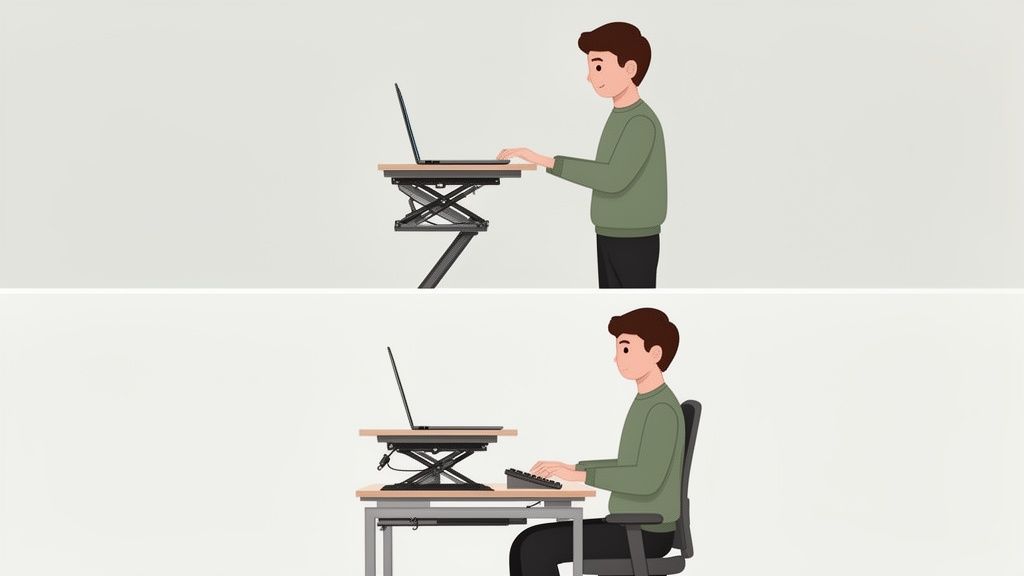
The combination of both elements allows for a seamless transition between sitting and standing, without interrupting your ergonomic posture. Your body remains in motion, while your field of vision and working position are consistently aligned.
Dynamic working while sitting and standing
A height-adjustable desk changes the height of your entire work surface. Without an adjustable laptop stand, your screen would be too low when you stand up. The result would be another unhealthy posture.
The stand solves this problem. It ensures that eye level is correct in every position.
- When sitting: You adjust the stand so that the top edge of the screen is at eye level.
- When standing: You raise the desk and readjust the height of the laptop stand.
This process takes only a few seconds but has a great effect on comfort and health. You can find out more about this in our article on how to properly use a height-adjustable desk in your daily work.
An ergonomic workplace is a system that adapts to you. The synergy of a sit-stand desk and a height-adjustable laptop stand creates this flexibility.
A seamless transition for maximum ergonomics
A well-coordinated setup makes switching between postures effortless. You raise the table, adjust the stand, and continue working focused.
This creates a work environment that promotes movement and ensures a stable, ergonomically correct posture. This is particularly important in times of remote work and flexible work models.
Constant eye level as key
Constant eye level is crucial. Your neck should always remain in a neutral, straight position. A height-adjustable laptop stand combined with a DESKSPACE desk makes exactly that possible.
This synergy creates a workplace that proves its worth in practice. It actively supports you in working healthier and preventing tension.
Who is a height-adjustable laptop stand suitable for?
A height-adjustable laptop stand is a versatile tool. Its usefulness depends on what you do at your desk. The requirements for your setup and the stand vary depending on the activity.
If you specifically tailor your workstation to your main activity, you will benefit from better ergonomics and an optimized workflow.
For power users in the home office
Space is often limited in the home office. A laptop stand helps to create a functional and tidy workspace.
A solid stand turns your laptop into the main screen. Combined with an external keyboard and mouse, a comfortable workstation is created that takes up little space.
- Utilize space: The space under the stand is ideal for notebooks or external hard drives.
- Create structures: The separation of screen and input devices promotes an upright posture.
- Focus through order: A tidy desk reduces distractions and promotes concentration.
For creators and tech professionals
For creatives and developers, the desk is part of the creative process. Here, ergonomics, aesthetics, and the integration of multiple devices count.
A high-quality laptop stand, for example made of aluminum, enhances the setup visually. It is indispensable when the laptop is used as a second monitor next to a larger display. This way, you bring both screens to a uniform height.
A well-thought-out setup is a tool that promotes creativity. When the technology works smoothly, ideas flow better.
For this target group, three points are particularly important:
- Absolute stability: A firm stand is a must, especially when using graphic tablets.
- Clean cable management: Integrated guides keep the desk free of cable clutter.
- Perfect dual-monitor setup: The ability to adjust the laptop screen exactly to the height of the main monitor is easy on the eyes.
For gamers and entertainment fans
Long gaming sessions are strenuous for the body. A bad posture leads to tension and can impair reaction time. The correct screen position is crucial.
A height-adjustable laptop stand brings the screen to eye level. This relieves the neck and ensures a concentrated posture. The stand also improves air circulation under the device. This helps to prevent overheating in powerful gaming laptops and keep performance stable.
Setup, care, and use of your stand
A good height-adjustable laptop stand can accompany you for years if you take care of it. Proper setup, regular maintenance, and conscious use ensure its function and appearance.
Correct initial assembly is important. Most models are uncomplicated to set up. Tighten all screws and joints so that nothing wobbles.
Commissioning and positioning
Follow the manufacturer's instructions exactly during assembly.
After assembly, place the stand centered in front of you on the desk. The ideal distance to the body is approximately an arm's length.
A stable stand is the result of careful setup. After assembly, check that the stand is wobble-free before placing your laptop on it.
A firm stand prevents slipping and protects your device from falling.
Care tips for a long lifespan
Caring for your laptop stand is easy. Regular cleaning ensures that it looks good and functions well.
- Cleaning: A soft, slightly damp microfiber cloth is sufficient for most materials such as aluminum or plastic. Do not use aggressive cleaners.
- Check joints: Occasionally check the screws on the joints of adjustable models. Retighten them slightly if necessary.
- Clean silicone pads: Wipe the non-slip pads regularly to maintain their grip.
Avoid common mistakes during use
To maximize the lifespan of your stand and work ergonomically, you should avoid some typical mistakes.
- Incorrect height adjustment: Always adjust the height so that the top edge of your screen is at or just below your eye level.
- Overload: Observe the maximum load capacity of the stand. Do not place unnecessarily heavy objects on it.
- No external keyboard: Without an external keyboard and mouse, the ergonomic advantage of the stand is greatly reduced. Your arms and shoulders cramp.
Frequently asked questions about laptop stands
Here you will find answers to the most common questions about laptop stands, formulated briefly and precisely.
What is the ideal height for a laptop stand?
The rule for relaxed neck muscles is simple: The top edge of your screen should be at or just below your eye level. This way, you look straight ahead instead of bending your head down. This prevents neck tension.
A steplessly adjustable model is the best choice. This allows you to find the exact position that suits you and your workstation.
Do I need an external keyboard and mouse?
Yes. To fully exploit the ergonomic advantages of a laptop stand, an external keyboard and mouse are indispensable. Your laptop is at eye level. This is good for your neck, but bad for your arms if you use the laptop keyboard.
A separate keyboard and mouse allow for the relaxed 90-degree posture of the arms and elbows. This is key to sustainably relieving shoulders, arms, and wrists.
Without these two devices, the ergonomic benefit of a stand is lost.
What material should a laptop stand be made of?
For most applications, aluminum is the best material. It is a good compromise between stability, light weight, and modern aesthetics.
Aluminum conducts heat well and helps to passively cool your laptop. Also, look for non-slip silicone pads on your model. They protect your device from scratches and ensure a firm stand.
A height-adjustable laptop stand is the perfect partner for an ergonomic desk. Discover the right solutions at Deskspace to make your workplace healthy and productive. Find your ideal setup now at https://deskspace.de.


